Capabilities · Upgrades and Migrations
Plan the upgrade
from what is actually running.
Live versions and support dates from your provider, the dependencies around each resource, and a safe order to work in.
What's Included
1 job and 1 quick assessment for upgrades and migrations.
Jobs do the work. Quick assessments grade it on a fixed checklist, with the evidence behind every check.
- 01
We get you started.
Every job and quick assessment installs free with Operator. Copy a prompt and run it yourself, or have us or a partner run it with you.
- 02
Better on the graph.
Answers come from live state, owners, reach and cost in your Cloud Intelligence Graph™, not a guess from code.
- 03
Better as a team.
On Pro, everyone works from one shared graph. Findings, plans and context pass between people, and a correction made once counts for everyone.
Jobs 1
- Plan an upgrade or migrationWhat is affected, what forces the timing, and the order to do it in.
Quick Assessments 1
- LifecycleWhat is near end of support or expiry, with dates read from the provider.
The Problem
Upgrades start from a spreadsheet that is already wrong.
Versions are copied from code or memory, and the dependencies show up halfway through.
- Versions nobody checked The code says one version. Production may run another.
- Deadlines found late End of standard support arrives before anyone planned for it.
- Approvals discovered mid-change A database in a regulated account needs a different path, and someone else's sign-off.
What the Graph Checks
A plan you can actually follow.
- Live versions, everywhere they run Read from the provider in every Environment, not from memory.
- Support dates from the provider So the deadline in the plan is the real one.
- A safe order Staging first, one instance at a time, with the way back stated for each step.
- A person approves each step Including the ones that need a change approval in a regulated account.
Try It Yourself
Copy the prompt. Run it in your AI tool.
Run it in your AI tool with OpsCanvas installed. This is a real prompt from the OpsCanvas Help examples.
Sample Jobs
- Upgrades Runs: opscanvas-starter-upgrades-migrations
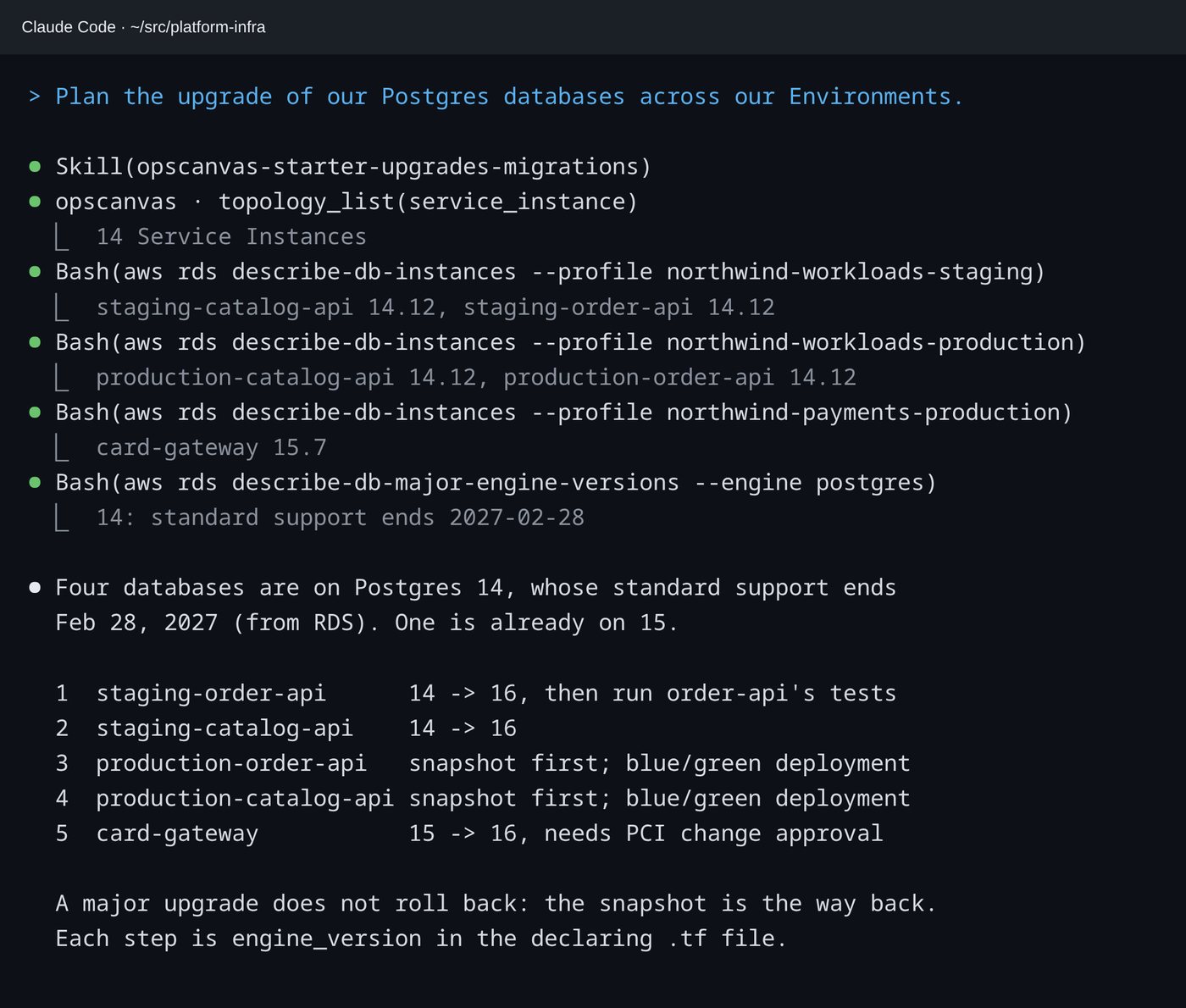
Plan the upgrade of our Postgres databases across our Environments.- With the graph
- Live versions and support dates come from the provider. Staging goes first, one instance at a time, and a snapshot is the way back.
In the Session
Five databases, one ordered plan.
Four databases are on a version whose standard support ends in February 2027. The plan orders them, staging first, and flags the one that needs a PCI change approval.
On Pro, the whole team plans against one shared graph, so the order and the owners are the same for everyone. Planning a migration or modernization? Partners deliver it for their clients →
Upgrades and Migrations
Plan your next upgrade from live state.
Free with Operator, in the AI tool you already use.