Capabilities · Resilience
Recovery plans,
checked against what is running.
Your backup tools know what they protect. The graph shows what exists, what depends on what, and what was never protected.
What's Included
2 jobs and 5 quick assessments for resilience.
Jobs do the work. Quick assessments grade it on a fixed checklist, with the evidence behind every check.
- 01
We get you started.
Every job and quick assessment installs free with Operator. Copy a prompt and run it yourself, or have us or a partner run it with you.
- 02
Better on the graph.
Answers come from live state, owners, reach and cost in your Cloud Intelligence Graph™, not a guess from code.
- 03
Better as a team.
On Pro, everyone works from one shared graph. Findings, plans and context pass between people, and a correction made once counts for everyone.
Jobs 2
- Health checks and SLA reportsHow a Service or the estate is doing now, or over a period.
- IncidentsWhat is affected, what changed, the timeline, cleanup and the postmortem.
Quick Assessments 5
- Production readinessOne scorecard across deploy, security, failover, backup and ownership.
- FailoverWhether a Service survives losing a zone, region or dependency.
- Backup and restoreWhether data is backed up, protected, and restorable within targets.
- ObservabilityWhether a problem users feel would page someone.
- Launch readinessCapacity, quotas and limits against the peak you expect.
The Problem
The gap is what nobody pointed the backup at.
Recovery plans are written once. The cloud keeps changing underneath them.
- New resources, no policy The database from a new pipeline, the volume attached after the policy was set.
- Targets nobody has checked RTO and RPO assumed from a runbook, not verified against configuration.
- Gaps without an owner Even when a gap is found, nobody is sure whose it is.
What the Graph Checks
Four answers before the next incident.
- Unprotected resourcesAvailable What exists with no backup policy, and who owns it.
- Recovery targets against real configurationAvailable RTO and RPO checked against what is running.
- Your backup tools, with a mapAvailable They stay. The graph shows what they were never pointed at.
- Every gap becomes a task with an ownerAvailable And Pro keeps checking as the cloud changes.
Go deeper Backup Posture Assessment
Try It Yourself
Copy the prompt. Run it in your AI tool.
Run it in your AI tool with OpsCanvas installed. These are real prompts from the OpsCanvas Help examples.
Quick Assessments
- Production readiness Runs: opscanvas-starter-assess-production-readiness
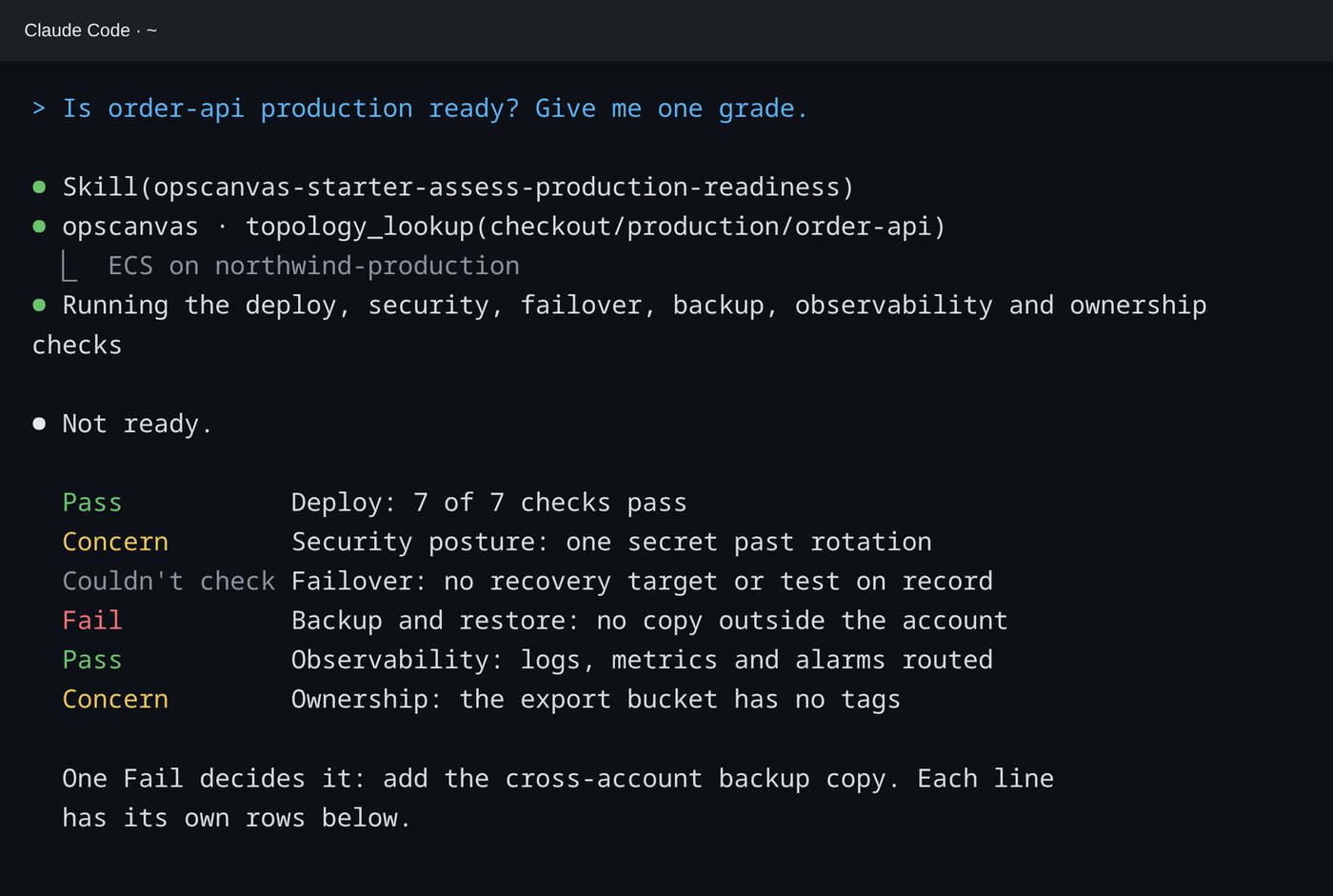
Is order-api production ready? Give me one grade.- With the graph
- Deploy, security, failover, backup, observability and ownership checks, each graded, with the one Fail that decides it: no backup copy outside the account.
In the Session
One grade, and the reason for it.
Each check is graded Pass, Concern, Fail or Couldn't check, so you know what was verified and what was not.
Better With the Graph
The same question, two different answers.
| Backup tools alone | With the Cloud Intelligence Graph™ | |
|---|---|---|
| What is protected | What they were pointed at | Everything that exists, checked |
| What depends on what | Not their job | In the graph |
| Recovery targets | Assumed from the runbook | Checked against configuration |
On Operator, this work runs against your own slice of the estate. On Pro, the whole team runs it against one shared graph, so what one engineer confirms, everyone can rely on. See Pro →
Resilience
Find your first unprotected resource today.
Free with Operator, in the AI tool you already use.