Platform · Security and Trust Center
Safe by Design.
Your cloud estate data stays on your machine. OpsCanvas is never in the change path.
Key information a security review needs, in one place: how OpsCanvas runs, what it stores, what leaves the machine, and what we share under NDA.
In Thirty Seconds
Five facts your security team will ask about first.
It runs on your machine
An app installed from npm, with a local MCP server and a small background service. The graph and cost data live in two local files in your user profile.
Your cloud estate data stays local
Prompts, cloud resources, cost data and credentials stay on your machine. On Pro, the confirmed structure each engineer publishes syncs to your team's workspace, on servers OpsCanvas hosts.
It never holds your cloud credentials
It reads through identities you approve, in place. The one key it keeps is a read-only certificate for the cost export you set up.
It is never in the change path
Your AI tool makes any change itself, with your access, under its own approval settings. OpsCanvas gives it the blast radius first.
You confirm what enters the graph
Your AI tool proposes the application structure and you confirm it. The joins between sources are deterministic, with no model in them.
For Your Security Review
Take it with you.
The two-page overview answers the questions most reviews start with. The technical reference has the exact paths, connections and permissions.
How It Works
Three parties, and a clear line between them.
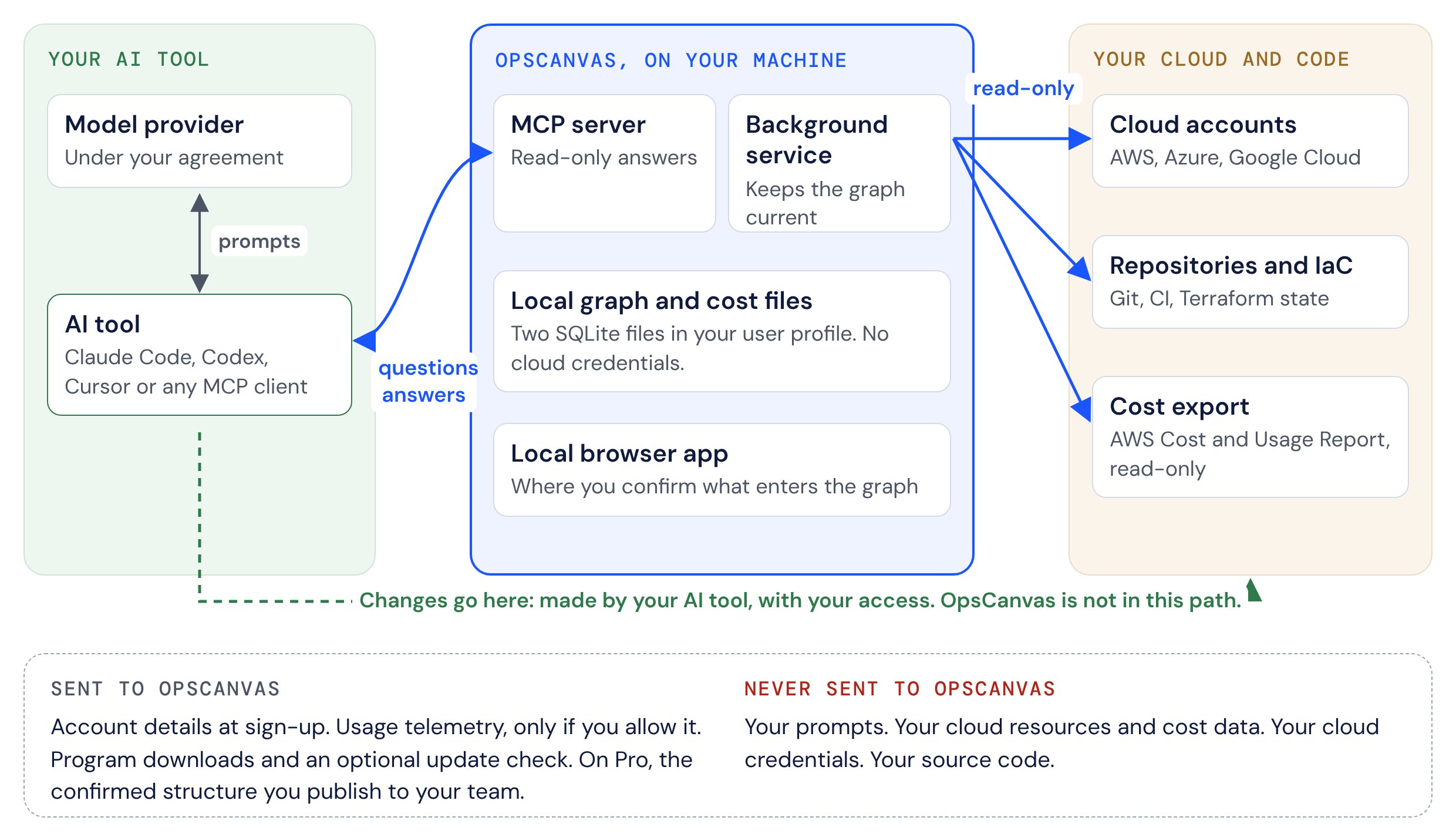
Your AI tool asks OpsCanvas questions and gets read-only answers. OpsCanvas reads your cloud and code through access you approve. Any change your AI tool makes goes straight to your cloud, never through OpsCanvas.
- Is it a container or an app?
- An app. You install it with
npm install -g @opscanvas/opscanvas, then runopscanvas setup. It runs on macOS, Linux and Windows x64 with Node 22.13 or newer. Setup runs a small background service and registers a local MCP server with the AI tools you choose. - Which AI tools does it work with?
- Any tool that supports the Model Context Protocol. Setup guides cover Claude Code, Claude Desktop and Cowork, OpenAI Codex, Cursor, GitHub Copilot CLI and others. See the documentation.
- How does it connect sources together?
- Deterministically. Joining cloud resources, cost data, repositories and Terraform state uses no model, so the same inputs always produce the same graph.
- Does it scan our network?
- No. OpsCanvas reads only the cloud APIs, repositories and files you point it at, through access you approve. It has no crawling, probing or network scanning capability.
Data and Storage
Two local files, in your user profile.
OpsCanvas keeps all of its data in one folder in each user's profile. We can share the exact locations for your deployment on request.
- What is stored?
- Two SQLite files. One holds the graph: applications, services, environments, repositories, deployments and cloud resources. The other holds cost data. Neither holds your cloud credentials or secrets.
- How large does it get?
- The graph is typically a few megabytes. Cost data is kept for three months by default, which stays under about 5 GB for an estate of 50,000 resources. Longer retention grows storage in proportion.
- How do we delete it?
opscanvas uninstallremoves the app, the background service and its AI tool registrations, and deliberately keeps your data folder, printing where it is. Delete that folder to erase the data. An administrator can delete it remotely.- Is our data used to train models?
- Not by OpsCanvas. We never receive your prompts, cloud resources or cost data. What your AI tool sends to its model provider is governed by your agreement with that provider.
What Leaves Your Machine
Only software administration leaves the machine. Never your cloud estate data.
OpsCanvas itself makes four connections, all for running the software: installing it, checking for updates, your account, and optional usage telemetry. None carries your cloud estate data. On Pro, the structure you publish also syncs to your team's workspace. Reads of your cloud and code go directly from your machine to those providers, through the access you approve.
| Connection | Used for | What is sent | Can you turn it off? |
|---|---|---|---|
Package downloadspackages.opscanvas.io | Downloading the program file on first run and after upgrades | A standard download request | Needed to install. Restricted networks can use an approved internal mirror. |
Update checkregistry.npmjs.org | Checking whether a newer release exists | A request for the latest version number | Yes: opscanvas setup --no-update-check |
Account service*.opscanvas.io | Registration, usage telemetry if you allow it, and feedback you choose to send | Account details you enter; telemetry events (see below) | Telemetry: yes. Answer no at setup, or turn it off later in the app. |
OpsCanvas appapp.opscanvas.io | Signing in, and Pro teams | Your sign-in. On Pro, the confirmed structure you publish to your team. | Used only when you sign in or join a Pro team |
Exact host names, proxy settings and the full telemetry field list are in the technical reference.
- Do prompts or cloud estate data leave the machine?
- No. Your prompts, cloud resources, cost data, source code and credentials stay on your machine. On Pro, the confirmed structure each engineer publishes syncs to your team's Pro workspace, on servers OpsCanvas hosts. See Editions for exactly what that includes.
- What does usage telemetry contain?
- Pseudonymous events: a random install ID, the type of event, the name of each OpsCanvas tool called, cloud provider names such as "aws", in some diagnostics the name of your AI tool, the app version and the operating system. Never prompts, answers, account IDs or resource names. Setup asks before turning it on, and you can turn it off at any time.
Credentials and Access
Your access stays yours.
- Does OpsCanvas collect our credentials?
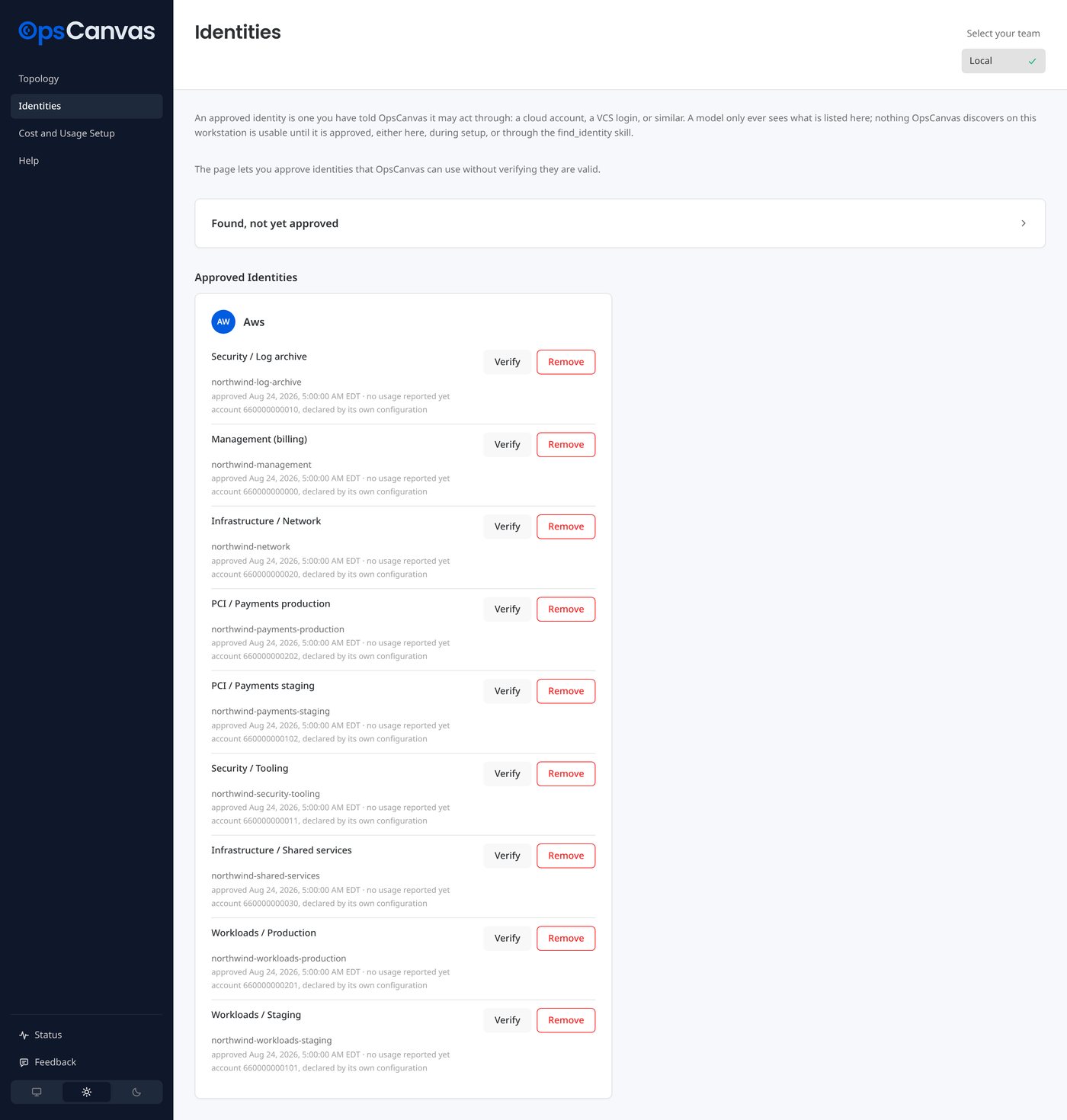
- No. It uses the identities you approve, such as AWS SSO profiles or an Azure login, in place on your machine. It never collects, stores or transmits your credentials, and nothing it finds on the workstation is usable until you approve it.
- Is there any key OpsCanvas keeps?
- One, if you set up cost data. The cost setup creates a dedicated read-only IAM role and an IAM Roles Anywhere trust anchor in your AWS account. OpsCanvas keeps a local certificate that gets short-lived, read-only access to your cost export, so daily downloads do not depend on your personal login.
- What does the cost setup grant?
- List and read access to your Cost and Usage Report export prefix only, plus decrypt for that export's KMS key if one is used. No write or delete. You review the full CloudFormation template before it runs, and it does not modify an existing export, bucket or key policy. The full permission list is in the technical reference.
- Can we limit what OpsCanvas can reach?
- Yes. Scope is exactly the repositories, accounts and cost exports you connect, and you can change it at any time. In the app you choose which identities OpsCanvas itself may use. Identities your AI tool uses stay under that tool's own approval settings.
AI and Models
Your AI tool, your model, your terms.
- Which model sees our data?
- Only the model in the AI tool you already use, under your agreement with its provider. OpsCanvas answers your AI tool's questions with read-only tool calls, and those answers enter that tool's context. OpsCanvas never sees your prompts or your model credentials.
- Does OpsCanvas call a model of its own?
- No. When OpsCanvas needs the application structure proposed from your code, your own AI tool does that work. OpsCanvas does not call any model or send anything to a model provider.
- Can OpsCanvas limit what the model sees?
- It controls what its own tools return, which is only data from its local files, never credentials or secrets. Files your AI tool reads on its own are governed by that tool's settings.
- How do we give it standing instructions?
- In your AI tool, where you already control them: files such as
CLAUDE.mdorAGENTS.md, or your tool's skills and rules.
Changes and Approvals
OpsCanvas informs changes. It never makes them.
- Who makes changes to our cloud?
- Your AI tool, using your access and its own approval settings. OpsCanvas is not in that path. Before the change, it gives your AI tool the context to get it right: what the change will touch, who owns it, and what depends on it.
- What does OpsCanvas write?
- Only its own local graph. Cloud resources and cost are added automatically from read-only sources. The application structure is proposed and waits for you to confirm it in the local app, where you can untick anything you do not want.
- Why does a person confirm the graph?
- A wrong dependency before a production change is expensive. Once confirmed, every later session and every AI tool works from the same ground truth.
- What about AI agents acting on their own?
- Agent action controls are part of Enterprise, coming in 2027. We are working with design partners now. Talk to us if you would like to be one.
Software Integrity
A known package, a verified program file.
- How is the software delivered?
- As the public npm package
@opscanvas/opscanvas. On first run it downloads one program file for your platform and checks it against a checksum shipped inside the npm package before it runs. - Does it work behind a proxy or offline?
- It honors
HTTPS_PROXYandNO_PROXY. For restricted or air-gapped networks, an administrator can host the program file on an approved internal mirror. - How are updates handled?
- You upgrade through npm, when you choose. The background service checks npm for a newer release and shows a notice; turn that off with
opscanvas setup --no-update-check. - How do we remove it?
opscanvas uninstallunregisters OpsCanvas from your AI tools, stops and removes the background service, and removes downloaded program files. See Data and storage to erase the data.
Editions
Where your data lives, edition by edition.
| Operator | Pro | Enterprise | |
|---|---|---|---|
| Where it runs | Each engineer's machine | Each engineer's machine, plus your team's Pro account hosted by OpsCanvas | Your own environment (coming 2027) |
| Credentials | Stay on the machine | Stay on each engineer's machine | Stay inside your boundary |
| Cloud resources and cost data | Stay on the machine | Stay on each engineer's machine | Stay inside your boundary |
| Sent to servers OpsCanvas hosts | Account details, and usage telemetry if you allow it | The confirmed structure each engineer publishes, synced to your team's workspace: applications, services, environments, repository addresses and how they connect. Plus account details and telemetry if allowed. | Nothing from your cloud |
Enterprise Deployment
Fits the way your IT team already manages tools.
- Can administrators push and manage it?
- Yes. Deploy it as a managed MCP server through your AI tool's administrator policy, from the public npm package or an internally packaged copy, alongside your device management tooling such as Intune.
- Can we wipe it remotely?
- Yes. All OpsCanvas data lives in one known folder in the user profile, so an administrator can delete it remotely. We share the exact locations with your IT team.
- We work for several clients. How do we keep them apart?
- Today, use a separate operating system user or virtual machine per client, each with its own OpsCanvas install and its own identities. Talk to us about separation for consultants and service providers.
- We use just-in-time or time-limited access.
- OpsCanvas works through the identities you approve. Walk us through your access flow and we will validate OpsCanvas against it.
Compliance
Straight answers for your review.
- What is your SOC 2 status?
- SOC 2 Type II is planned. If your procurement process needs specifics, contact us and we will share where it stands.
- Will you complete our security questionnaire?
- Yes. Send it over and we will answer in your format from our architecture, data handling, access and deployment documentation, and tell you plainly about any gaps.
- What is available under NDA?
- A deeper technical review of the architecture, and our security policies. Request them here.
- Where is your privacy policy?
- At opscanvas.ai/privacy-policy. Privacy questions go to privacy@opscanvas.ai.
Report a Vulnerability
Found something? Tell us.
Email security@opscanvas.ai with the details and steps to reproduce. We acknowledge every report and keep you informed while we fix it.
Talk to Us
Bring your security team. We like those conversations.
Walk through the architecture with us: data flows, identities, the cost setup and the deployment model that fits your boundary.