Oscar Ops: Free Operator Edition

Meet Oscar. Your AI Cloud Engineering Agent.

One Agent, Two Surfaces

Work in the terminal. See it all in the Web UI.

Oscar lives in your terminal and your browser. The CLI is where you investigate; the local Web UI is where your topology, tasks, findings, and reports come to life. Same agent, same context, side by side. It proposes. You approve. Nothing changes without you.

Runs locally on your workstationBring your own AI modelHuman approval before any actionFree forever, no credit card

Illustrative session. Oscar proposes the fix; you approve it.

What is Oscar Ops?

Oscar Ops is an AI cloud engineering agent that runs locally on your workstation, connects to your cloud with the credentials you already have, builds a live Cloud Intelligence Graph™ of your environment, and proposes actions that execute only with your approval. The free Operator Edition installs in minutes; Oscar Pro adds shared context, tasks, and oversight for teams.

Security and Safety

Safe to put in front of your cloud.

Oscar was designed for engineers who are accountable for what runs in production. Your data stays in your environment, your credentials stay on your machine, and nothing executes without your sign-off.

  • Runs locally on your workstation
  • Uses your existing credentials, never stores them centrally
  • Your AI model, your API key, your account
  • Human approval before every action
  • Full audit trail with decision traces
  • Permission-aware: never proposes beyond your access

Most Common Prompts

Ask your cloud anything. In plain English.

These are the questions engineers ask Oscar every day. Every answer is grounded in your live environment, with the evidence trail behind it.

oscar
>
Scanned 14 accounts across 3 regions in 90 seconds.
3 items need attention before standup:
⚠ ALB target health: 3 unhealthy targets in prod
⚠ Backup job failed twice overnight (staging)
⚠ New AI agent appeared Saturday: full EC2 access, no owner
Correlated CloudTrail, deploys, and config changes.
Root cause: deploy v1.9.2 at 02:14 UTC removed the Lambda concurrency limit.
Blast radius: 3 downstream services. No data loss detected.
✓ Fix drafted. Awaiting your approval.
Traversed roles, policies, SCPs, and permission boundaries.
7 identities can delete: 2 direct, 4 role-assumed, 1 via a legacy exception.
⚠ Two are service accounts with no rotation in 14 months.
Queried CloudTrail, GitHub, Datadog, and PagerDuty.
4 changes across 3 services. One caused the Saturday cost spike.
✓ 2 clean deploys, 1 Terraform config change, 1 capacity rule update.
Walked the dependency graph two hops downstream.
orders-db connection pool saturates at 2.1x current load.
Redis cluster and NAT gateway need headroom before launch.
Checked sidecars, cron jobs, alarms, and IAM for this service.
4 things: a cron sidecar, 2 alarms pinned to instance IDs, an instance profile, a hardcoded EIP.
✓ Pre-flight checklist drafted for this migration.
42 services across 14 accounts. Ownership inferred from runtime behavior.
Tier 1: checkout, payments, auth. Platform team owns 60% of infra.
✓ Walkthrough generated. Ask me about any node.
Timeline reconstructed from 214 events across 4 systems.
Root cause, blast radius, and remediation steps drafted.
✓ 3 follow-up actions proposed. Ready to paste.
Answers grounded in your Cloud Intelligence Graph™ · illustrative output

Illustrative answers from a sample environment.

Get Started

Install Oscar. Get answers in 30 minutes.

Four steps from download to your first context-grounded cloud investigation. No new accounts, no onboarding calls, no dashboard to configure.

1

Install Oscar Ops

Download and install Oscar Ops from the documentation. Free Operator Edition, no credit card required.

brew install oscar-ops
2

Run Setup

Oscar detects your cloud accounts, connected tools, and accessible systems. Builds your initial context graph automatically.

oscar /setup
3

Run Your First Command

Try /check, /cost, or ask a question in plain English. Oscar queries your connected systems and returns a grounded answer.

oscar /check --all
4

Review and Decide

Oscar returns a clear explanation with supporting evidence and suggested next steps. You decide what happens next. Nothing changes without your approval.

oscar /act --approve

Day-to-Day Operations

Start the day with a health check, not a hunch.

One command scans every account and region you have access to and returns what needs attention, ranked. Baselines come from your own history, so Oscar flags what is abnormal for your environment, not what is loud.

oscar
>
Scanning 14 accounts · 3 regions · EKS, RDS, ELB, Lambda, S3...
✓ us-east-1 · 312 resources healthy
✓ eu-west-1 · 118 resources healthy
3 items need attention, ranked by blast radius:
⚠ ELB backend-lb-prod-08a9b2 · 0 connections for 6 months · $40/mo
⚠ AI agent infra-automation-prod · full EC2 access · owner unknown
⚠ RDS analytics-replica · no backup policy attached
✓ Done in 92s. Type /task to assign, or ask me why.
Team: Techflow Dynamics (OR) | medium effort | latest cache hit | $0.0000 | v0.1.0

Illustrative output from a sample environment.

The Context Graph

Every investigation makes the next one smarter.

Oscar builds your Cloud Intelligence Graph™ automatically: resources, dependencies, ownership, history, and cost, inferred from runtime behavior rather than tags. It persists across sessions, so Oscar never starts from zero and works on untagged environments from day one.

The Cloud Intelligence Graph assembling from resources, dependencies, ownership, history, and cost
The graph is built and stored in your environment, not ours.
How Assessments Run

Oscar does no open-ended network scanning. Assessments run as two scoped, deterministic, approval-gated phases: inventory discovery through approved connectors, then deterministic policy checks against that inventory. Read-only, with no changes to your environment.

Assessments

From daily driver to evidence-backed assessments.

The same agent runs structured assessments of your environment: backup posture, AI agent inventory, cloud waste. Here Oscar kicks off a backup posture assessment and pages through the Backup Posture Report it produced for the fictional Acme Systems sample environment.

Sample assessment, illustrative data.

From Findings to Tasks

Findings become tasks. Tasks find owners.

Oscar turns findings into tasks with the evidence attached. With Oscar Pro, tasks are assigned across the team and carry their full investigation context with them, so handoffs skip the Slack archaeology.

Two Editions

Start solo. Scale to your team.

Operator Edition is free forever for individual engineers. Oscar Pro adds the team layer: shared context, shared tasks, oversight, and coordination.

Operator Edition

For Individual Engineers

The full Oscar experience for one operator: CLI plus local Web UI, your own context graph, and grounded answers from day one.

$0free forever, no credit card
  • Cloud health checks across all your accounts
  • Cost analysis, spike investigation, and attribution
  • Incident root cause from the CLI in minutes
  • Local Web UI with topology, findings, and reports
  • Bring your own AI model, switch anytime
  • Human approval before any action, always
Install Oscar

The Journey

Oscar grows with you.

Start as one operator with a free download. End with a cloud engineering agent working across your teams. Every stage builds on the context the last one created.

Operator Edition
Day 1

One engineer, real answers

Install Oscar, run setup, and get your first grounded answer in under 30 minutes. Health checks, cost investigations, and incident root cause become one command instead of an afternoon.

The graph compounds
Month 1

Oscar knows your environment

Every command enriches your Cloud Intelligence Graph™. Oscar now knows your baselines, your dependencies, and your history. Its answers keep getting more specific to you.

Oscar Pro
The team joins

Shared context, tasks, and oversight

Your team works from one combined graph. Investigations hand off with full context, tasks route to the right owner, and leads see progress without asking in standup.

The platform
Across teams

Your cloud engineering agent, everywhere

Assessments, monitoring, and governed workflows extend Oscar across the organization: evidence-backed reports, posture that stays current, and remediation at scale with approvals built in.

Enterprise

A fleet of Oscars across your organization.

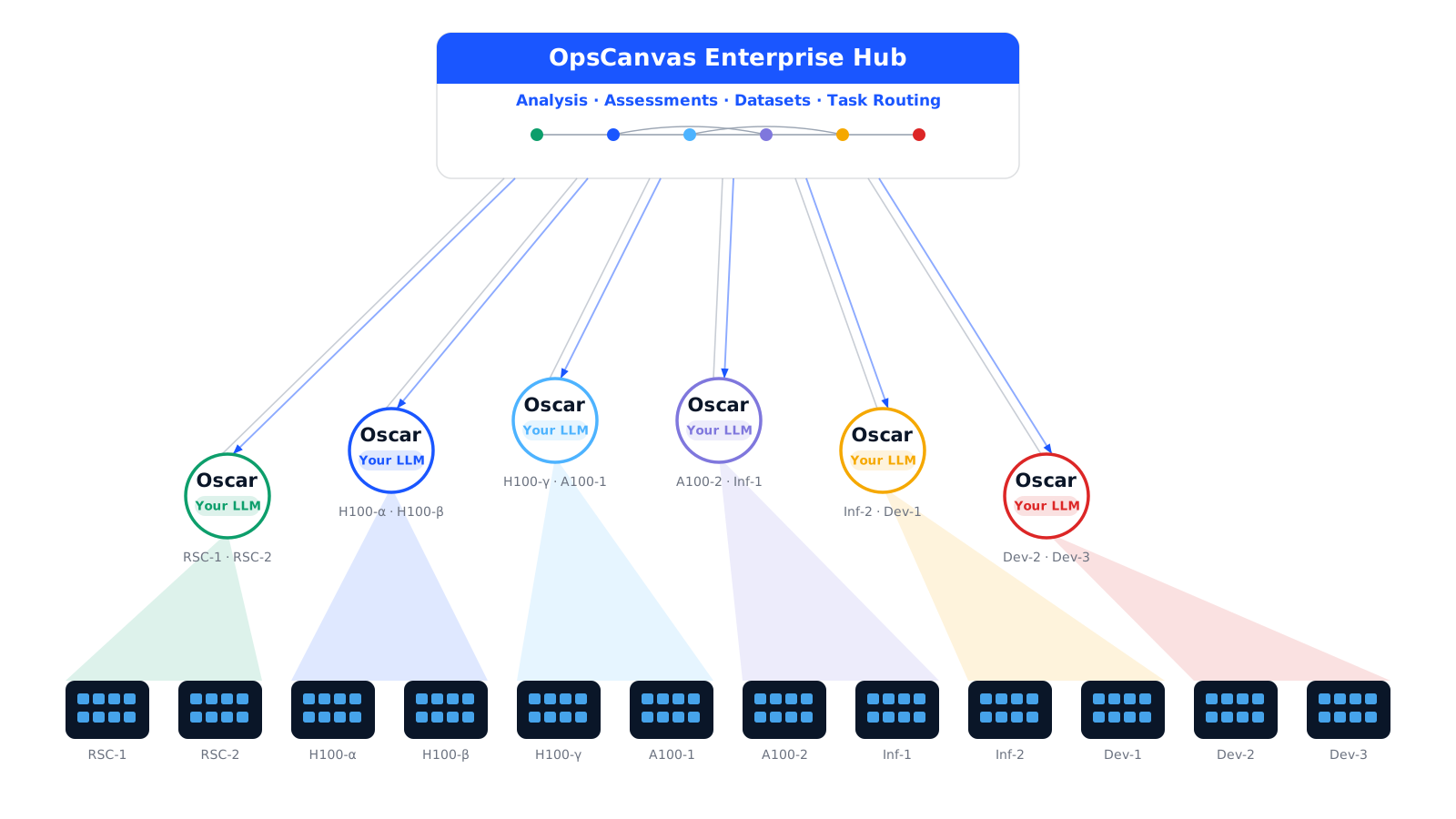
At enterprise scale, the OpsCanvas Enterprise hub deploys a fleet of Oscar agents. Each one discovers its slice of your infrastructure, reports telemetry back to the hub, and receives remediation tasks routed with approvals built in. The fleet works in parallel; your team keeps oversight.

The OpsCanvas Enterprise hub deploying a fleet of Oscar agents that discover infrastructure, report telemetry, and receive remediation tasks
Illustrative fleet deployment.

Before You Download

Frequently asked.

What is Oscar Ops?

Oscar Ops is an AI cloud engineering agent that runs locally on your workstation, connects to your cloud with the credentials you already have, builds a live Cloud Intelligence Graph™ of your environment, and proposes actions that execute only with your approval. The free Operator Edition installs in minutes; Oscar Pro adds shared context, tasks, and oversight for teams.

Why not just use Claude or ChatGPT for my cloud questions?

Generic LLMs answer questions about cloud concepts. Oscar answers questions about your cloud. The difference is the Cloud Intelligence Graph™: a persistent, automatically maintained model of your specific environment including what runs, what owns what, what depends on what, and what has changed. You cannot paste that into a chat window. Oscar builds it automatically, and structured context from the graph means roughly 50% fewer tokens per query than manually pasted prompts.

Is Oscar safe to connect to my environment?

Oscar runs entirely on your workstation. Your cloud data is queried locally and never transmitted to OpsCanvas infrastructure. Oscar uses your existing credentials and operates within exactly the permission boundary you already have. It never executes any change without explicit human approval, and every proposed action is shown with its full evidence trail first.

What is free and what is in Oscar Pro?

The Operator Edition is free forever for individual engineers: the CLI, the local Web UI, your own context graph, health checks, cost investigations, and incident root cause. Oscar Pro is $99 per user per month and adds the team layer: a shared context graph across the team, task sharing and handoffs with full investigation context, admin oversight of team task lists, role-based controls, and a team-level audit trail.

Which AI models does Oscar support?

Oscar supports all major foundation models including Anthropic Claude, OpenAI GPT, Meta Llama, Google Gemini, Mistral, and DeepSeek. You configure the model of your choice at setup. Your API key stays on your machine and you are billed directly by the model provider. You can switch models at any time without losing your context graph.

How long until Oscar is useful?

Under 30 minutes from install to your first context-grounded answer. Oscar builds its initial context graph automatically during setup and works on untagged environments from the first scan. By the end of your first week, it has a richer picture of your environment than most tagging-based systems ever achieve.

Get Started

Your AI cloud engineering agent.
Up and running in 30 minutes.

Free to install. Works with the tools you already use. No new dashboard. No credentials shared. Your first context-grounded cloud answer in under 30 minutes.

Free Operator Edition · Bring your own AI model · Works with untagged environments · No credentials shared