Capabilities · Change Risk
Check every change
against your live graph.
Check any change against your live graph, from your engineers or their AI agents, inside the session and before the pull request exists.
What's Included
4 jobs and 4 quick assessments for change risk.
Jobs do the work. Quick assessments grade it on a fixed checklist, with the evidence behind every check.
- 01
We get you started.
Every job and quick assessment installs free with Operator. Copy a prompt and run it yourself, or have us or a partner run it with you.
- 02
Better on the graph.
Answers come from live state, owners, reach and cost in your Cloud Intelligence Graph™, not a guess from code.
- 03
Better as a team.
On Pro, everyone works from one shared graph. Findings, plans and context pass between people, and a correction made once counts for everyone.
Jobs 4
- Plan a changeWhat a plan or pull request touches, what can't be undone, and what it costs.
- Ship and verifyAgreed stop criteria, a staged rollout, and proof of what actually shipped.
- Deployments and blast radiusWhat a bad deploy could reach, and how to narrow it.
- Find driftWhat was changed by hand, who changed it, and whether to keep or revert it.
Quick Assessments 4
- Change riskTarget, reach, irreversible steps, data, way back, drift and cost.
- Production deployA go or no-go before a Production deploy.
- Environment parityWhether Staging is close enough to Production to prove anything.
- DecommissionWhether something is safe to delete, and what it saves.
Every Change Is Now a Risk Decision
AI writes changes faster than anyone can check them.
Most change checks look at a pull request or a plan file. Much of what changes production never passes through one.
- Changes made in the session An agent runs a command directly. There is no pull request to review.
- Resources nobody put in code Console changes and unmanaged resources are invisible to code-only checks.
- Owners nobody can name The person who should approve the change is often the hardest thing to find.
What the Graph Checks
Three answers before every change.
Checked against live state across clouds, whether or not the infrastructure is in code.
- What it touchesAvailable The resources, services and environments a change affects.
- Who owns itAvailable An owner for everything in the blast radius, so the right person approves.
- What sits outside your IaCAvailable Dependencies a Terraform plan can't see.
- What already driftedComing to Pro What changed since the last known good state.
Try It Yourself
Copy the prompt. Run it in your AI tool.
Run it in your AI tool with OpsCanvas installed. These are real prompts from the OpsCanvas Help examples.
Sample Jobs
- What is affected Runs: opscanvas-starter-orient
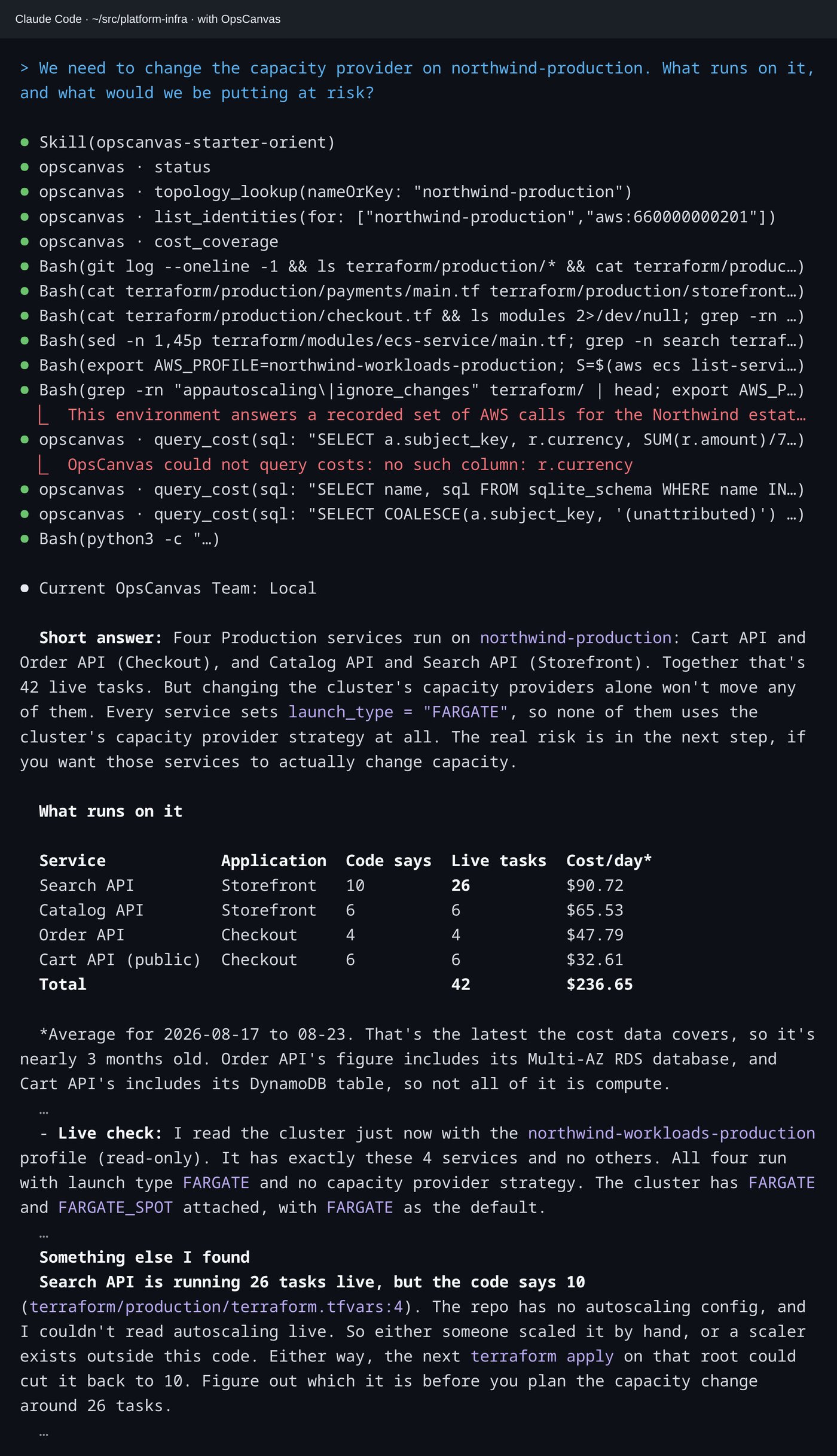
We need to change the capacity provider on northwind-production. What runs on it, and what would we be putting at risk?- Without the graph
- Answers from the Terraform alone: four services, 10 tasks for search-api, and a note that it did not check the live account.
- With the graph
- Reads the cluster live through an approved identity: search-api runs 26 tasks where the code says 10, with cost per service and a warning that the next apply would cut it back.
In the Session
The same question, answered from live state.
Claude Code was asked the same question twice, once without OpsCanvas and once with it. With OpsCanvas, it checked the code against what is actually running.
Better With the Graph
The same question, two different answers.
| Without OpsCanvas | With OpsCanvas | |
|---|---|---|
| What runs on it | Four services, read from the Terraform | Four services, confirmed against the live cluster |
| search-api tasks | 10, what the code says | 26 running live, where the code says 10 |
| Cost | Not covered | Cost per day for each service, with the dates the data covers |
| The next step | Changing capacity providers alone moves nothing | The same, plus a warning that the next apply would cut search-api back to 10 |
On Operator, this work runs against your own slice of the estate. On Pro, the whole team runs it against one shared graph, so what one engineer confirms, everyone can rely on. See Pro →
Change Risk
Run your first pre-change check today.
Free with Operator, in the AI tool you already use. Want it delivered across the estate? Talk to us about a Change and Resilience Risk Assessment.